Showing posts with label mobile learning. Show all posts

Sunday, November 7, 2010

iPad Apps for English Language Teachers

Well like a lot of people I’ve bought an iPad over the summer and I’ve been having my first taste of shopping for apps to extend the capabilities of the iPad. I’ve also been having a look at how some of these can be used for language learning, so I thought I would share with you a little bit of information about the first few apps I’ve tried.

Forvo
For those of you who don’t know Forvo, it’s a marvelous pronunciation dictionary site which is collecting together audio examples of of the pronunciation of different words from languages and speakers all round the world.
The app works as a simple pronunciation dictionary which you can carry with you in class and whenever a new word comes up, you can get an example pronunciation form it. For many of the more common words in English you can get multiple examples from different speaker (male, female, UK, US, Australian etc.)

The app could be really handy for use in class, especially if you aren’t confident about your own pronunciation or your students want to study a particular accent. The app runs on iPhone or iPad. You’ll need to have a connection to download the pronunciation examples and unfortunately there isn’t any capability to record and upload your own examples (you’ll need to go to the website to do that), but it’s still a pretty useful tool.

It isn’t free, but it’s pretty cheap and you can download it from: http://itunes.apple/forvo-pronunciation/

Dragon Dictation
This app is from the makers of the popular Dragon voice recognition software and as you would expect it is designed to recognise your words and transcribe them as text. It works pretty well too, though it does make some mistakes which you then have to correct. You can correct the errors by typing in the corrections or tapping the surface where the error is and trying to say the words again.
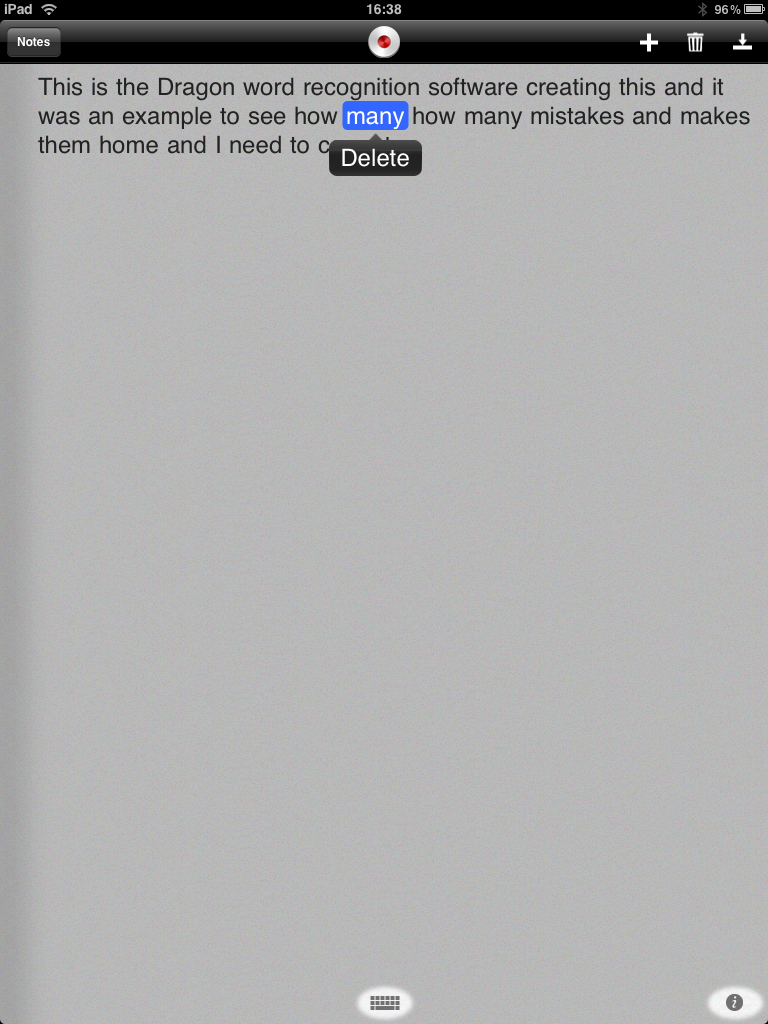
This would be a good way to get students working on their speaking skills and correcting errors in text. It’s also a very handy tool if you don’t like typing a lot as once you have created a text on it you can either copy or send it by email or post it straight to Facebook or Twitter. You don’t need a connection to use the voice recognition part, but you’ll need to be connected to share your texts. It also works best if you have an external microphone for your device.

Mobile Air Mouse
This is a really clever little app that transforms your iPad, iPod or iTouch into a remote touch pad controller and keyboard for your computer. That might not seem like such a big deal, but what it means is that once you have the free software installed on the main computer in your classroom, any student that has Air Mouse on their mobile device can take control of the computer, write or draw on the board and interact with your learning materials without leaving their seat.

This duplicates a lot of the functions of an interactive whiteboard and slate, so it might also save some money. There’s a free version and a pro version. The app runs through your wireless connection.
Flipboard
Flipboard is my favourite app so far. It is a type of feed reader for the iPad. The really great thing about Flipboard though is that it converts the feeds into a magazine type format that you can then easily browse. This is particularly useful for feeds from things like Twitter, which can be very reader unfriendly and I’m now getting a lot more information a lot quicker from Twitter than I previously was using a desktop based app.
So this is a great app for keeping up with your PLN as well as finding images and text to use in class. Flipboard is also free, so that’s another big bonus, but you will need a connection while you are using it.
Here’s a video showing how it works:


MeeGenius
This is an app that has been developed to support the website (or could it be the other way around) MeeGenius contains a collection of illustrated books for primary level kids. The books have audio accompaniment and words are highlighted as the kids listen.
Great to get younger learners reading and listening in English. The app isn’t free but it’s very reasonable priced (especially compared to buying the books) and it contains 12 free books 6 of which are ready installed and 6 more that you need a connection to download. If you want more books after that you can buy more.
SonicPics
This is a handy app that allows you to add audio to images or sequences of images and then export them as video files. There is a free version that allows you to create videos of up to three images and 10 mins recording time, or you can buy the pro version and make unlimited sequences. This is really handy for grabbing screen shots from your iPad or iPhone and adding audio to them or for adding audio to photographs.
Describing pictures and images is a handy way of getting students to practice their speaking and the videos can then be exported for sharing.
I hope you find some of these apps useful, and if you don't yet have an iPad, I hope they give you some idea of the enormous potential that these tools have.

Related links
Best

Nik Peachey Read More..

Thursday, August 19, 2010

Survey Results: Mobile learning for ELT

The purpose of the survey was to ascertain the level of awareness and openness to mobile learning among English language teachers. I also wanted to find out to what degree and how teachers were already using mobile learning both in their teaching and and professional development and to establish whether they would be willing to pay for and use mobile content. The survey also collected information about the teachers’ existing access to mobile services and the kinds of device they are using to get access to mobile Internet.


The survey was carried out during June and July of 2010. The survey was answered by over 500 English language teachers.

The results of this survey were collected online using a web based survey site called SurveyMonkey.com. The online survey was distributed through:
  • My Twitter Network (3k teachers world wide)
  • The British Council’s ELTeCS list (15k teachers world wide)
  • A number of email based ELT discussion lists (these are long established lists from around the world. They are teaching rather than technology focused)

The respondents are likely to be early technology adopters as they are mostly people who are already involved in some form of online teaching network. However the majority of the networks used to distribute the survey were not focused on the use or discussion of technology in teaching, but are mainly forum to discuss mainstream teaching.
I hope you find this information useful. Many thanks to all those people who took the time to answer the questions and share information.

Related links:
Best

Nik Peachey Read More..

Friday, September 25, 2009

A Speed Reader with a Library

I'm never really sure what the value of being able to read quickly is and whether this effects the amount of information you actually retain when you read, but I do know that getting EFL and ESL students to read in chunks and getting them to read as much as possible can be very beneficial to their language development.
I've come across quite a few online speed reading sites, but so far I think ReadSpeeder is the best. The interface is quite simply designed and easy to use. It looks just like the kind of controls you would find on a cassette or CD player. ReadSpeeder chunks the text and you can change the speed at which you see the chunks of the text or pause it and just click to got to the next phrase as you read.

The things that make ReadSpeeder special though are:
  • It has its own built in library, so there are loads of classic books that students can get started with straight away.


  • There is also a neat bookmarklet. You drag it to your toolbar, then whenever you get to a web page you want to speed read, you can just click on it and it will be played through ReadSpeeder.
  • If you register you can start adding and saving your own texts simply by cutting and pasting.
  • Perhaps best of all though is that you can access a dedicated mobile site (http://m.readspeeder.com) on i-phone or i-Pod Touch and access your saved books. This is a great feature as students can work alone at home or anywhere else on improving their reading. It's also quite a good way to read on an i-phone as it makes the text bigger.
As I said, I'm not sure if being able to read faster is such a great skill, but this is still a good way to get your students working through texts and trying to understand 'gist' without them stopping to check every word and also a good way to get them seeing text in chunks.
  • You could use it as I said above to get students to read for gist and just see how much of the text they understand after reading through one time.
  • You could use it as a way to get students to revise a text.
  • You could even get students to recite the text as they speed read it and gradually try to improve the speed. You might well have to start very slowly.
  • Some students can find this kind of time challenge motivating and it can encourage them to repeatedly read the same text to improve their speed.
Well, I hope your students enjoy trying ReadSpeeder. It may not be the best tool for every text they read, but it's a good way to add a bit of variety to your reading activities and to give students access to a tool they can use outside of class (if they have an i-Pod or i-Phone).

You can find 35 + online reading activities for EFL ESL students here.

Related links:
Best

Nik Peachey Read More..

Monday, July 7, 2008

Create your own sms groups

With the vast increase in the number of people with phones capable of receiving sms, having your own group for your students seems like a pretty good idea.

GupShup provides you with the ability to make this happen for free. You 'simply' register for free on their site and then start creating groups. The site has quite a few groups there already and some with more than 2,000 members. The groups are split into categories and there's a couple of pages of educational ones, which include quite a few word of the day type services.

Once you register you can either send out messages to the group through the website or by using your phone.

I guess the downside of this is that your students are going to be paying every time they send a message, and I've no idea what the rates are likely to be. I tried to register using my own phone here in Morocco, but never get the confirmation message with my registration code, so that's about as far as I got.
  • Anyone else tried this?
  • Do you know of other similar services that are free?
Would be very interested in hearing comments from anyone else doing anything like this.

To try GupShup go to: http://www.smsgupshup.com

Best

Nik Peachey Read More..

Thursday, March 13, 2008

Create Projects for iPod

This is a website that on the surface of it seems like quite a good idea. It's called Mogopop and it supposed to help users create and share multimedia projects for iPod.

You have to register (for free) and this gives you your own space (up to 50Mb) to create your own projects. You can create an image and video library them create pages and add or link the media to them, then when you are ready you can publish the whole thing on the Mogopop site for other to download and enjoy.

As well as creating your own projects, you can of course download other people's (if the they are public), but this involves downloading and installing the Mogopop manager (18Mb).

It's pretty quick and easy to install, but you have to be using the right kind of iPod. I wasn't, so I still haven't got any of the projects onto mine, there's also no way of checking out and viewing what you download before you download it, which for me is a huge disadvantage.

There is an education section and there are some promising titles in there. I also liked the interface and it did seem really easy to create projects, but downloading them and viewing them seems to be the main obstacle.

Anyway, I think this is a really good idea and one that students might well enjoy, so I'm going to persist with it for a bit longer. If I have any luck you may well see a tutorial on http://nikpeachey.blogspot.com/ in the next few weeks.

I'd love to hear from anyone else who tries / has tried it.

Best

Nik Read More..

Thursday, February 21, 2008

DVD converter

Handbrake is a really useful piece of free software I've been using recently. It enables you to convert and even edit DVDs so that you can play them on other devices. This includes a range of mobile devices like i-pod and Sony PSP as well as just playing them on your computer / TV.

It also gives you the option of copying them with the subtitles showing or just saving particular scenes and reduces the file sizes for storing back ups of your DVDs.

It's really useful and runs on a range of platforms MAC and Linux as well as Windows.

Hope you find it useful, but remember to respect copyright laws.

Best

Nik Read More..

Wednesday, February 13, 2008

Downloading Online video

iDesktop.tv provides a really useful and user friendly service for anyone who wants to use video clips from sources like YouTube, but doesn't want their students looking around at anything unsuitable, or for anyone who has ever found a really useful clip, only to go back later and find it has moved or been removed.

You can use the site to search through a huge collection of videos from various video sharing sites and when you find something you like the site will download and convert it to a file type of your choosing.

The range of file types is great and includes ones suitable for mobile phones and i-pods, so if you want to get your students doing some mobile learning then this is a seriously useful site.

The site is free and you can use it without login or registration, though if you do register, it's free and you do get other services too.

Hope you find this useful and by all means leave a comment here if you've tried it.

Best

Nik Read More..

Saturday, February 9, 2008

Free video editing software

I just spotted this rather nice simple video editing suite from Pinnacle. It's free to download (150Mb) and has quite a few nice features that put it above the standard Microsoft video editor.

It supports flash and direct upload to YouTube, it also enables you to save your movies in a number of formats, many of which are compatible with a range of mobile devices such as i-pod and Sony PSP.

I've downlaoded it and it seems pretty easy to use. You can add transitions, text , music sound effects etc.

The catch is that if you want to keep using the codecs that enable you to export to DivX and Mepg2 - 4, then after a 15 day trial you'll need to buy those. Not sure yet how much they are though.

You can download it from: http://videospin.com/

If you don't need those, then this is a really handy video editor for free.
It runs on Vista and XP, but not MAC, but then if you have a MAC you won't need it.

Hope you find this useful

Best

Nik Read More..