Showing posts with label video conferencing. Show all posts

Friday, July 24, 2009

Record Online WebCam Interviews with Wetoku

I've just been trying out a great new tool called Wetoku. Wetoku is a video conferencing tool which enables one to one live communication which can easily be recorded and then saved for comment or embedded into blogs or websites.

Here's an example of what the finished product looks like. This was a quick interview I tried with Graham Stanley of the British Council in Barcelona. (The width of the player is 514 pix so it doesn't fit so well in my 400 pix content column)


You can see the compete video here on the Wetoku site

Creating an interview is really easy. You just log in to the Wetoku site (still in beta at time of writing) Click on 'Start Your Interview' add the information about who is being interviewed etc. Then click 'Next'.

You should then go to the interview interface and get a link to send to your interviewee (by email).

Once the click the link they'll appear next to you and you just need to click on the record button and start your interview.

When you are finished, stop the recording and watch it. you can then either record it again or click 'Done'. When you click 'Done' you'll see the interview and be able to share it using the URL or embed code. Visitors to the site can also leave comments on the interview.


All your video interviews are stored in your profile and it is possible to go back and edit the information on them, but not the video itself.

How can we use this with students?
This is a fantastic tool for setting homework or distance learning assignments for our students.
  • They can interview each other in pairs then post the videos and you can leave feedback for them in the comments section.
  • You can record short video tutorials with them and they can watch afterwards and review.
  • You can create interviews for them to watch and comment on them.
  • They can create their own interviews for their blogs
This ability to record and watch the interviews again / comment on them makes this a really useful teaching tool. The sound quality is pretty good so students can really hear them selves quite clearly. This is an ideal tool for getting them to reflect on and try to improve their performance.

I hope you enjoy this tool and please feel free to leave any suggestions or links to interviews you create below.

Related links:
Best

Nik Peachey Read More..

Wednesday, February 25, 2009

Very Easy Video Conferencing

Fonomo is one of the simplest and easiest free video conferencing solutions I have seen. If you're looking for no frills, no downloads and no charges, then this could be a good place to start. Just go to the Fonomo site. Decide if you want private or public conferencing.


Choose an option for sending invitations to the person you want to conference with.
Generate the code and then send it to them.
Then go to your page and make sure you allow access to your video and audio.
And there you have it. You are video conferencing.
It looks like the private option is one to one and the you need the public option for more than two people. I'm not sure what the maximum is and how well it would take the load of having groups, but for just two people it looks simple and easy and best of all no downloads or charges.

Hope you find it useful.

Related links:
Best

Nik Peachey Read More..

Wednesday, December 17, 2008

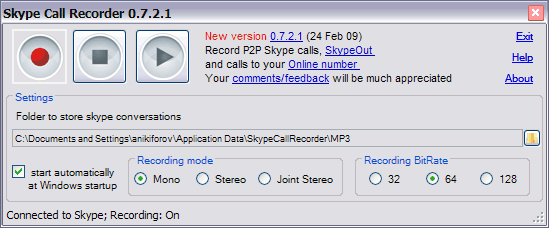
Recording Skype Calls

I haven't had a chance to try this yet as there isn't a MAC version available at present, but it does look like a very useful addition for anyone who uses Skype on a PC and wants to record calls. If you're wondering why anyone might want to do this I did write a posting for teachers on why this might be handy (See: Skype Part 1 Recording Audio) for creating your own audio materials etc.

Anyway, the Skype Call Recorder is free and at least according to their website blurb seems pretty good. It can record more than one stream at a time into separate files, which might be handy and then saves them as mp3.

There are some good installation instructions on the site too. You can download the whole thing as a zip file and at only 1.4 Mb, it seems like it may well be worth checking out.

Let's hope there's soon something like this for MAC users too.

Related links:

Best

Nik Peachey Read More..

Monday, November 24, 2008

Bubble Joy for Thanks Giving

This is a real treat for anyone who wants to send a Thanks Giving message to any Friends from the US. It's from Bubble Joy and they have a selection of humorous frames that you can add your own short video message to.


All you need is a WebCam and a microphone. It's really easy to do, just select the card you want, then give the flash program access to your video and audio and record your message.


I particularly like the dancing turkey, but I guess we'll all have our favourites!


So just go to the Bubble Joy site and start recording.
Hope you enjoy this and maybe you could get your students sending thanks giving messages too.

Related links:
Best

Nik Peachey Read More..

Thursday, November 20, 2008

Great WebCam Software

One of the things that I love about my MAC is Photo Booth and its ability to add different backgrounds and effects when you are using a WebCam. It's a great tool to use with students to create motivating and personalised materials for a whole range of things. Here's an example of some characters I created to generate a story around (I then imported them into Comic Life).

But now it seems that you can do some similar things on your PC with this free software from ManyCam

I haven't had time to download and install it yet (PC is still booting up!!!!) but it looks like there is an impressive range of effects (3836!) that you can download from their site, many of which have been user submitted: ManyCam Effects

The software also works with quite a good collection of existing services, so you can also use it for video conferencing.

There's a nice demo video here showing what it can do

You can also check out some user submitted ones

Well it looks like my PC has finally booted up, so now maybe I can try it out.

Hope you enjoy it.

Related links:

Best

Nik Peachey Read More..